1.Network Hacking
Network Hacking is generally means gathering information about domain by using tools like Telnet, NslookUp, Ping, Tracert, Netstat, etc.It also includes OS Fingerprinting, Port Scaning and Port Surfing using various tools.
a.Ping :- Ping is part of ICMP (Internet Control Message Protocol) which is used to troubleshoot TCP/IP networks. So, Ping is basically a command that allows you to check whether the host is alive or not.
To ping a particular host the syntax is (at command prompt)--
c:/>ping hostname.com
example:- c:/>ping www.google.com
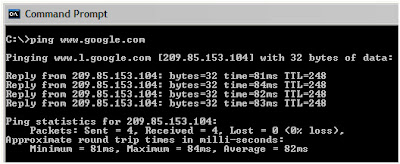
Various attributes used with 'Ping' command and their usage can be viewed by just typing c:/>ping at the command prompt.
b.Netstat :- It displays protocol statistics and current TCP/IP network connections. i.e. local address, remote address, port number, etc.
It's syntax is (at command prompt)--
c:/>netstat -n

c.Telnet :- Telnet is a program which runs on TCP/IP. Using it we can connect to the remote computer on particular port. When connected it grabs the daemon running on that port.
The basic syntax of Telnet is (at command prompt)--
c:/>telnet hostname.com
By default telnet connects to port 23 of remote computer.
So, the complete syntax is-
c:/>telnet www.hostname.com port
example:- c:/>telnet www.yahoo.com 21 or c:/>telnet 192.168.0.5 21
d.Tracert :- It is used to trace out the route taken by the certain information i.e. data packets from source to destination.
It's syntax is (at command prompt)--
c:/>tracert www.hostname.com
example:- c:/>tracert www.########.in

Here "* * * Request timed out." indicates that firewall installed on that system block the request and hence we can't obtain it's IP address.
various attributes used with tracert command and their usage can be viewed by just typing c:/>tracert at the command prompt.
The information obtained by using tracert command can be further used to find out exact operating system running on target system.
2.NET BIOS Hacking
NetBIOS stands for "Network Basic Input Output System".
It was originally developed by IBM and Sytek as an Application Programming Interface (API) for client software to access LAN resources.
By default it runs on port 139.
NetBIOS gives the various information of the computers on a network, which includes computer name, username, domain, group, and many others.....!
The NBTSTAT Command :-
NBTSTAT is the command for manually interact with NetBIOS Over TCP/IP.
All the attributes (switches) used with nbtstat command and their usage can be viewed.
At the command prompt type-
C:\Windows>nbtstat

Sample NBTSTAT Response
C:\>nbtstat -A 117.200.160.174
NetBIOS Remote Machine Name Table
Name Type Status
----------------------------------------
PRASANNA <00> UNIQUE Registered
INSECURE LABS <00> GROUP Registered
PRASANNA <03> UNIQUE Registered
PRASANNA <20> UNIQUE Registered
INSECURE LABS <1e> GROUP Registered
MAC Address = 86-95-55-50-00-00
An intruder could use the output from an nbtstat against your machines to begin gathering information about them.
"<03> in above table is nothing but the username of that system."
The next step for an intruder would be to try and list the open shares on the given computer, using the net view command.
Here is an example of the Net View command-
C:\>net view \\117.200.160.174
Shared resources at \\117.200.160.174
Sharename Type Comment
----------------------------------------
C Disk Drive C:\
MySofts Disk My Softwares Collection
E Disk Drive E:\
The command was completed successfully.
This information would give the intruder a list of shares which he would then use in conjunction with the Net Use command, a command used to enable a computer to map a share to it’s local drive, below is an example of how an intruder would map the C Share to a local G: drive, which he could then browse...!
C:\>net use G: \\117.200.160.174\C
The command was completed successfully.
C:\>G:
G:\>
3.
What Does ARP Mean?
Address Resolution Protocol (ARP) is a stateless protocol, was designed to map Internet Protocol addresses (IP) to their associated Media Access Control (MAC) addresses. This being said, by mapping a 32 bit IP address to an associated 48 bit MAC address via attached Ethernet devices, a communication between local nodes can be made.
On a majority of operating systems, such as Linux, FreeBSD, and other UNIX based operating systems, and even including Windows, the "arp" program is present. This program can be used to display and/or modify ARP cache entries.
An example of the "arp" utility's output would look like the following:
Windows:
> arp -a
Interface: 192.168.1.100 .- 0x10003
Internet Address Physical Address Type
192.168.1.1 00-13-10-23-9a-53 dynamic
Linux:
$ arp -na
? (192.168.1.1) at 00:90:B1:DC:F8:C0 [ether] on eth0
FreeBSD:
$ arp -na
? (192.168.1.1) at 00:00:0c:3e:4d:49 on bge0
How ARP works?
Specifically for Internet Protocol Version 4 (IPv4), ARP maps IP addresses between the Network layer and Data Link layer of the Open System Interconnection (OSI) model.
For a more complete and thorough explanation of how address resolution works, and protocol specifics, please consult RFC 826.
ARP Protocol Flaws
ARP's main flaw is in its cache. Knowing that it is possible for ARP to update existing entries as well as add to the cache, this leads one to believe that forged replies can be made, which result in ARP cache poisoning attacks.
Terms & Definitions
ARP Cache Poisoning : Broadcasting forged ARP replies on a local network. In a sense, "fooling" nodes on the network. This can be done because ARP lacks authentication features, thus blindly accepting any request and reply that is received or sent.
MAC Address Flooding : An ARP cache poisoning attack that is mainly used in switched environments. By flooding a switch with fake MAC addresses, a switch is overloaded. Because of this, it broadcasts all network traffic to every connected node. This outcome is referred to as "broadcast mode" because, all traffic passing through the switch is broadcasted out like a Hub would do. This then can result in sniffing all network traffic.
1] Connection Hijacking & Interception: Packet or connection hijacking and interception is the act in which any connected client can be victimized into getting their connection manipulated in a way that it is possible to take complete control over.
2] Connection Resetting: The name explains itself very well. When we are resetting a client's connection, we are cutting their connection to the system. This can be easily done using specially crafted code to do so.
3] Man In The Middle: One of the more prominent ways of attacking another user in order to hijack their traffic, is by means of a Man In The Middle (MITM) attack. Unlike the other attacks, a MITM is more a packet manipulation attack which in the end however does result in packet redirection to the attacker . all traffic will get sent to the attacker doing the MITM attack. This attack however is specific. As opposed to MAC Address Flooding or other attacks against a router/switch, the MITM attack is against a victim, and also can be done outside of a switched environment. Thus meaning, an attack can be executed against a person on the other side of the country.
4] Packet Sniffing: Sniffing on a Local Area Network (LAN) is quite easy if the network is segmented via a hub, rather than a switch. It is of course possible to sniff on a switched environment by performing a MAC flood attack. As a result of the MAC flood, the switch will act as a hub, and allow the entire network to be sniffed. This gives you a chance to use any sort of sniffing software available to you to use against the network, and gather packets.
5] Denial of Service: MAC Address Flooding can be considered a Denial of service attack. The attempting to make it panic. This will cause the switch to drop into broadcast mode and broadcast all packet data. This however did not result in a crash, or the service to be dropped, but to be overloaded.main idea of the MAC flood, is to generate enough packet data to send toward a switch.
0 comments:
Post a Comment